The AI analytics workspace
Your data, dashboards, and AI analysts — in a native desktop app.
Web app, or other platforms (Windows & Linux coming soon)
Free forever plan · No credit card required · macOS 12+ on Apple Silicon (M1 or later)
Up and running in under a minute
No setup wizards, no configuration. The Mac install is three moves — then your whole workspace is on your desktop.
- 1
Download and open
Grab the .dmg and double-click it to open the installer.
- 2
Drag to Applications
Drop Intelligence Navigator into your Applications folder.
- 3
Sign in and go
Launch the app and sign in — everything stays in sync with the web app.

Total Revenue
+12.4%$1.36M
Net Profit
+8.1%$452.07K
Avg Order Value
+3.5%$184.20
Active Customers
-1.9%2,841
Every KPI, dashboard, and analysis — in one app.
Intelligence Navigator brings your key metrics into one scorecard with period comparisons and AI insights that explain what changed and why — on desktop or in the browser.
One scorecard for every KPI.
Revenue, profit, orders, churn, and custom metrics in a single view — with week-over-week, month-over-month, and year-over-year comparisons on every deep dive.
AI insights on every chart.
Plain-English bullets summarize trend direction, peaks, lows, and volatility — so you investigate causes, not just symptoms.
Dashboards your team can trust.
Pin any analysis to a shared dashboard or presentation deck — the same numbers for ops, finance, and leadership.
Ask questions in plain English.
Conversational analytics turns natural-language questions into charts, statistical analysis, and written insights — no SQL or formulas.
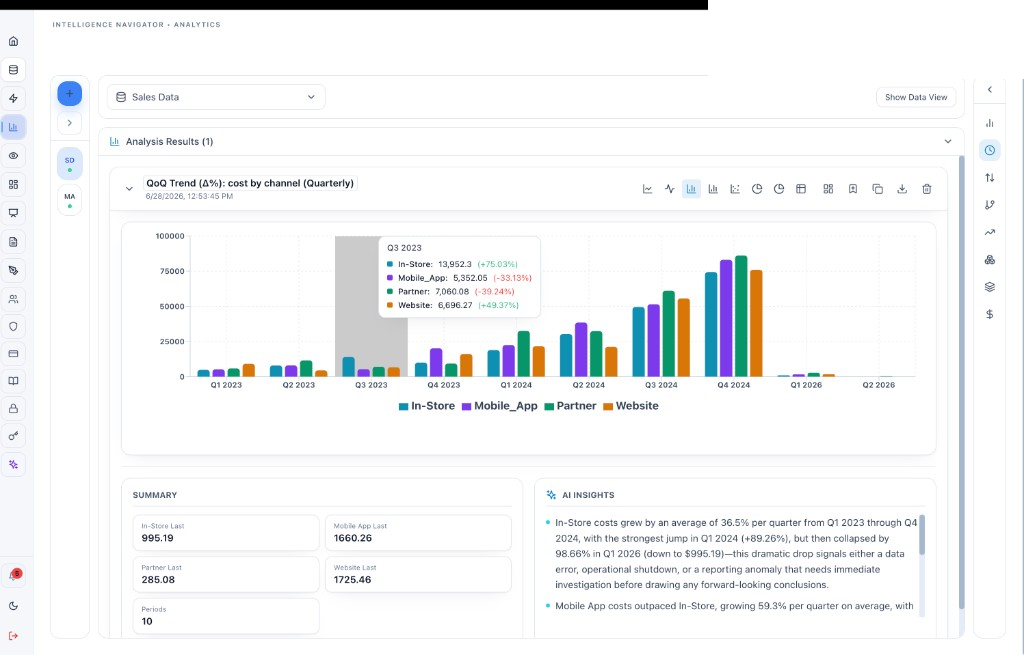
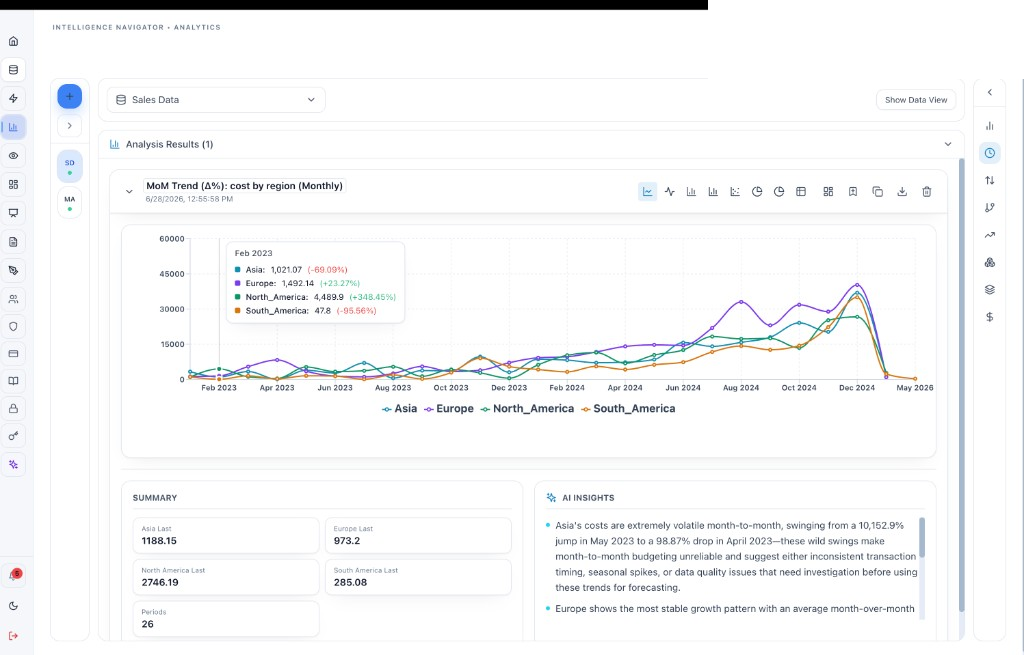
Business intelligence without the BI team.
Run trend, correlation, regression, clustering, and forecasting analyses on your data — computed in code, explained in plain English, and ready to share.
Trend and compare in one click.
Run MoM, QoQ, or YoY trend analyses on any metric — grouped by channel, region, product, or any dimension in your data.
Correlation and regression you can trust.
Pearson r, fitted lines, R², and grouped comparisons are computed in code — then explained in plain English so you know whether a pattern is real.
Clustering and segmentation.
K-Means groups customers or transactions by behavior with auto-selected k, scatter plots, and AI insights on which segments to retain or upsell.
Forecasting built in.
Project revenue, demand, and capacity forward with confidence intervals — no separate forecasting tool or data science team required.
Monday revenue report
Weekly · Mon 9:00 · Emails the leadership team
At-risk account scan
Daily · 7:00 · 3 accounts flagged today
Pricing brief refresh
Weekly · Fri 16:00 · Last run 2h ago
Run history · Monday revenue report
Automation that keeps working after you close the laptop.
Agentic AI workflows monitor your metrics, run scheduled analyses, answer questions over your documents, and flag what needs your attention — around the clock.
Agentic AI workflows.
AI agents that reason over your data and documents, run multi-step analyses, and recommend the next action — not just answer one-off questions.
Automated reports and alerts.
Schedule recurring reports and let the platform flag anomalies, slipping KPIs, and emerging trends before they become quarter-end surprises.
AI chatbots over your data.
Deploy chatbots that answer questions from your documents and datasets — for internal teams or customer-facing use, depending on your plan.
Document and vision intelligence.
Upload PDFs, contracts, and images — chat with them, extract key terms, and get answers with citations pointing to the exact source.
One platform, every capability
Everything inside Intelligence Navigator — desktop and web
One account, everywhere
Desktop and web share the same account and the same data. Start an analysis on your Mac, pick it up in the browser — dashboards, uploads, and chat history stay in sync.
Always up to date
The desktop app updates itself automatically in the background — you always run the latest version without lifting a finger.
Free to start, no card
The forever-free plan includes all analytics modules. Upgrade only when you need more capacity, automation modules, or customer-facing chatbots.
Frequently asked questions
Which Macs are supported?
The current desktop build is for Apple Silicon Macs (M1, M2, M3, M4) running macOS 12 or later. Intel Mac users can use the web app at app.xpherium.com — same features, no install.
Is there a Windows or Linux desktop app?
Not yet — native Windows and Linux builds are coming. For now, use the web app on any modern browser. It has everything the desktop app has.
Do the desktop and web apps stay in sync?
Yes. Both use the same account and the same data. Start an analysis on your Mac and pick it up in the browser — dashboards, uploads, and chat history are shared.
How do updates work?
The desktop app checks for updates automatically and prompts you when a new version is available. You can also return to this page anytime for the latest build.
Do I need a paid plan?
No. Intelligence Navigator has a forever-free plan — sign up or sign in with your existing account after installing. Paid plans add capacity, automation, and chatbots when you need them.
New to Intelligence Navigator? Start free today.
Create a free account, then download the Mac app or sign in on the web. All analytics modules included — no credit card required.
- Free forever plan
- Desktop and web, one account
- KPIs, BI, forecasting & automation included
Create your free account
Free forever · No credit card required
Already have an account? Log in